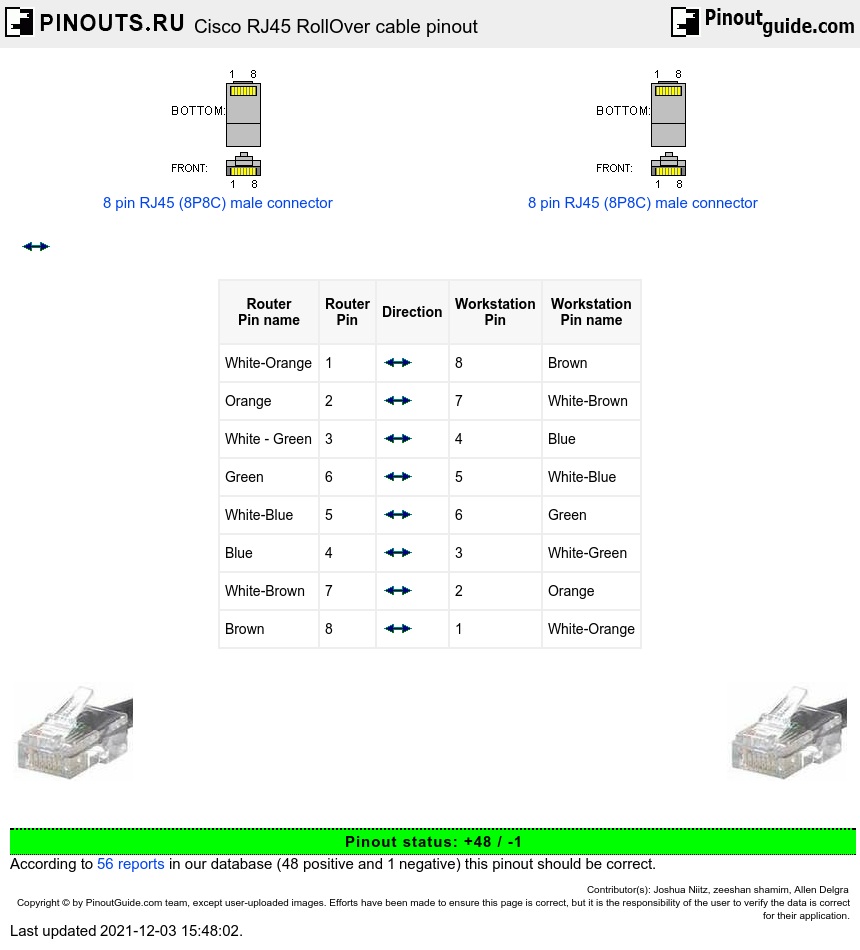
Rollover Cable:
You can identify a roll-over cable by comparing the two modular ends of the cable. Holding the cables side-by-side, with the tab at the back, the wire connected to the pin on the outside of the left plug should be the same color as the wire connected to the pin on the outside of the right plug. If your cable was purchased from Cisco Systems, pin 1 will be white on one connector, and pin 8 will be white on the other.
Uses of Rollover Cable:
Rollover cables, like other cabling types, got their name from how they are wired. Rollover cables essentially have one end of the cable wired exactly opposite from the other. This essentially “rolls over” the wires- but why would we need to do such a thing? Rollover cables, also called Yost cables, usually connect a device to a router or switch’s console port. This allows a programmer to make a connection to the router or switch, and program it as needed.
PC to Console Port
Router AUX port to External Modem
| Router Pin name |
Router Pin |
Direction | Workstation Pin |
Workstation Pin name |
|---|---|---|---|---|
| White-Orange | 1 |  |
8 | Brown |
| Orange | 2 | |
7 | White-Brown |
| White - Green | 3 | |
4 | Blue |
| Green | 6 | |
5 | White-Blue |
| White-Blue | 5 | |
6 | Green |
| Blue | 4 | |
3 | White-Green |
| White-Brown | 7 | |
2 | Orange |
| Brown | 8 | |
1 | White-Orange |
Notice that each wire is simply “rolled over.” These types of cables are generally not used very much, so are usually colored differently from other types of cables.
 correct
 incorrect